|
|
 发表于 2011-4-29 14:02:28
|
显示全部楼层
发表于 2011-4-29 14:02:28
|
显示全部楼层
已经申请了beta版,下载安装后试用了,挺好的。
LabVIEW 2011 Features and Changes
The Idea Exchange icon denotes a new feature that originates from a product feedback suggestion on the NI Idea Exchange discussion forums at ni.com.
Refer to the LabVIEW 2011 Upgrade Notes for a complete list of new features and changes, for information about upgrade and compatibility issues specific to different versions of LabVIEW, and for upgrading instructions.
Refer to the readme.html in the labview directory for known issues, a partial list of bugs fixed, additional compatibility issues, and information about late-addition features in LabVIEW 2011.
Installing LabVIEW
(Windows) With LabVIEW 2011 you can install LabVIEW and select modules and toolkits from the LabVIEW Platform DVDs. Refer to the Installing LabVIEW 2011 section of the LabVIEW Release Notes for more information.
TopNew Example VIs
Refer to the New Examples for LabVIEW 2011 folder on the Browse tab of the NI Example Finder to view descriptions for and launch example VIs added to the current version of LabVIEW.
TopBlock Diagram Enhancements
LabVIEW 2011 includes the following enhancements to the block diagram and related functionality.
Miscellaneous Block Diagram Enhancements
LabVIEW 2011 includes the following miscellaneous block diagram enhancements:
When you define a new event case for a control or indicator, Value Change is the default event. [Idea submitted by NI Discussion Forums member Bruce Ammons.]
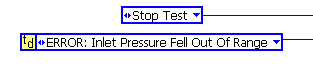
You can identify the instance of a type definition or strict type definition on the block diagram with a glyph marking the upper left corner of the instance . If you hover the cursor over the glyph, a tip strip displays the name of the type definition or strict type definition. [Idea submitted by NI Discussion Forums member Broken Arrow.]
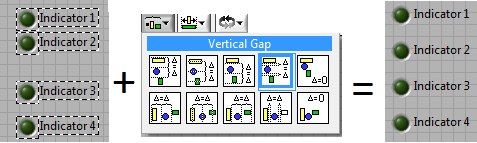
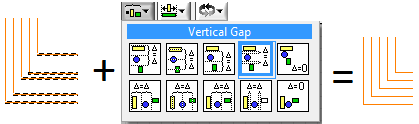
You can use the Align Objects and Distribute Objects pull-down menus to align and distribute wires on the block diagram. [Idea submitted by NI Discussion Forums member JackDunaway.]
In LabVIEW 2010 and earlier, you can create a type defintion only from the front panel. In LabVIEW 2011, you can create a type definition from the block diagram or front panel. Right-click the constant, control, or indicator you want to make a type definition and select Make Type Def. from the shortcut menu. [Idea submitted by NI Discussion Forums member crelf.]
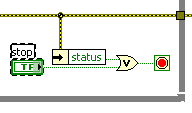
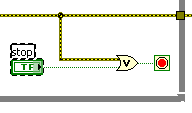
You can wire an error cluster directly to a Boolean function (And, Or, Exclusive Or, Not, Not And, Not Or, Not Exclusive Or, and Implies). Use this feature to handle errors using logical operations. If an error occurs, the error cluster passes a TRUE value to the Boolean function. [Idea submitted by NI Discussion Forums member Dany Allard.]
TopFront Panel Enhancements
LabVIEW 2011 includes the following enhancements to the front panel and related functionality.
Choosing Which Plots to View on a Graph or Chart
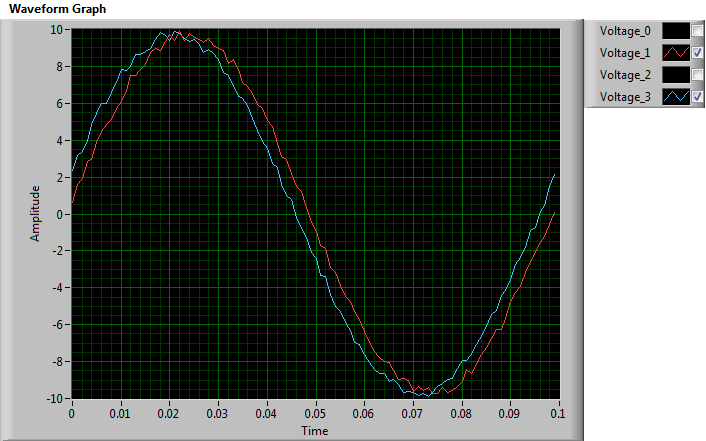
To choose whether to display a plot on a graph or chart, right-click the glyph in the plot legend and select Plot Visible from the shortcut menu. If there are multiple plots, you can right-click the plot legend and select Visible Items» lot Visibility Checkbox from the shortcut menu to display a checkbox next to each plot. Use the checkboxes to select which plots you want to display in the plot area. You also can use the Plot Visibility Checkbox Visible property to display the checkboxes programmatically. [Idea submitted by NI Discussion Forums member Sil3nc3r.] lot Visibility Checkbox from the shortcut menu to display a checkbox next to each plot. Use the checkboxes to select which plots you want to display in the plot area. You also can use the Plot Visibility Checkbox Visible property to display the checkboxes programmatically. [Idea submitted by NI Discussion Forums member Sil3nc3r.]
Miscellaneous Front Panel Enhancements
LabVIEW 2011 includes the following miscellaneous front panel enhancements:
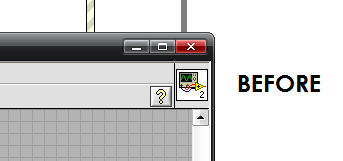
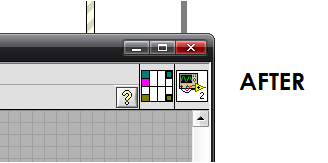
Every VI displays the connector pane in the upper right corner of the front panel next to the VI icon. You can add or edit terminals at any time without having to switch back and forth from the VI icon to the connector pane. [Idea submitted by NI Discussion Forums member blawson.]
TopEnvironment Enhancements
LabVIEW 2011 includes the following enhancements to the LabVIEW environment.
Dialog Box Enhancements
LabVIEW 2011 includes the following dialog box enhancements.
Miscellaneous Dialog Box Enhancements
LabVIEW 2011 includes the following miscellaneous dialog box enhancements:
Certain LabVIEW add-ons, such as the LabVIEW Robotics Module, include additional environment settings that allow you to focus on a particular subject area. If you install one or more of these LabVIEW add-ons, you can use the Choose Environment Settings dialog box to change from one environment to another without restarting LabVIEW.
On the Appearance page of the String Properties dialog box, the Display Style Visible checkbox allows you to display the style of the string object.
Use the Clear Compiled Object Cache dialog box to clear compiled code from the Application Builder object cache by selecting Application Builder from the Cache list.
Use the new Size page of the Properties dialog box for arrays to specify the number of dimensions in an array.
Palette Enhancements
LabVIEW 2011 includes the following palette enhancements:
Miscellaneous Environment Enhancements
LabVIEW 2011 includes the following miscellaneous environment enhancements:
You can perform an undo operation after you save a VI. [Idea submitted by NI Discussion Forums member mishklyar.]
The Help menu includes the new Check for Updates menu item, which opens the NI Update Service window.
As you load a VI, you can select Ignore All to ignore loading all missing subVIs. [Idea submitted by NI Discussion Forums member Ravens Fan.]
Application Builder Dialog Box Enhancements
LabVIEW 2011 includes the following enhancements to the LabVIEW Application Builder and build specifications:
TopLabVIEW Project Enhancements
LabVIEW 2011 includes the following enhancements to the LabVIEW project and related functionality.
Deleting Previously Built Files
To delete the previously built files of a build specification, right-click the build specification and select Clean from the shortcut menu. Selecting Clean deletes all files that only the previous build generates, not files created before the previous build. You can delete previous build files for stand-alone applications, .NET interop assemblies, packed project libraries, shared libraries, source distributions, and web services.
Miscellaneous Project Enhancements
LabVIEW 2011 includes the following miscellaneous project enhancements:
TopNew and Changed VI, Function, and Node Enhancements
LabVIEW 2011 includes the following new and changed VIs, functions, and nodes. Refer to the VI and Function Reference book on the Contents tab of the LabVIEW Help for more information about VIs, functions, and nodes.
New VIs and Functions
LabVIEW 2011 includes the following new VIs and functions.
Application Builder VIs
The Application Control palette includes the new Application Builder palette with the following new VIs:
Build
Deploy
Clean
Miscellaneous New VIs and Functions
LabVIEW 2011 includes the following miscellaneous new VIs and functions:
The Optimization VIs palette includes the Global Optimization VI.
The HTTP Client VIs palette includes the Config SSL VI.
The Probability & Statistics VIs palette includes the Skewness and Kurtosis VI.
The Packed Library VIs palette includes the Get Exported File Path VI.
Changed VIs, Functions, and Nodes
The following VIs, functions, and nodes changed in LabVIEW 2011.
TDMS Read—This function contains a new return channels in file order? input, which specifies whether the TDMS Read function returns data channels in the same order as they exist in a .tdms file. If the value of this input is FALSE, this function returns data channels in the same order as you specify in the channel name(s) in input. The default is FALSE.
Geometry VIs
The Geometry palette includes the following changed VIs.
The following VIs include a rotation order input, which specifies the order of the axes to rotate the coordinates around.
3D Cartesian Coordinate Rotation (Euler)
Direction Cosines To Euler Angles
Euler Angles To Direction Cosines
Miscellaneous VI, Function, and Node Changes
LabVIEW 2011 includes the following miscellaneous VI, function, and node changes:
The error terminals of the Variant to Data function now line up evenly with the majority of the error terminals of other functions and VIs. [Idea submitted by NI Discussion Forums member David_L.]
The General Linear Fit VI includes the Weight Out output that returns the actual weight of general linear fitting or returns the value you enter for Weight, depending on the method you specify.
TopNew and Changed Classes, Properties, Methods, and Events
LabVIEW 2011 includes new VI Server classes, properties, methods, and events. Refer to the LabVIEW 2011 Features and Changes»New VI Server Objects topic on the Contents tab of the LabVIEW Help for a list of new classes, properties, methods, and events.
VI Server Properties and Methods
LabVIEW 2011 includes the following VI Server method changes:
Scene:Read Scene File—Supports .dae files.
Scene:Write Scene File—Supports .dae files.
Enhancements to .NET Support in LabVIEW
Debugging Unexpected Behaviors of .NET Assemblies in LabVIEW
.NET objects can exhibit unexpected behavior when LabVIEW has a different version of the assembly in memory than the version you want to use. To identify this discrepancy and debug the assembly calls, refer to the .NET Assemblies in Memory dialog box. If you determine that LabVIEW loaded the wrong version of an assembly, you can adjust assembly locations on disk, create a configuration file, or reload updated assemblies to ensure that LabVIEW loads the correct assembly.
Loading .NET 4.0 Assemblies in LabVIEW
The most recent programming environments for .NET assemblies target new assemblies to run in the Common Language Runtime (CLR) 4.0 by default. Thus, although LabVIEW is still most compatible with the CLR 2.0, you can force LabVIEW to use the CLR 4.0 to load .NET 4.0 assemblies.
|
|


 狗仔卡
狗仔卡
 发表于 2011-4-26 20:59:56

 提升卡
提升卡 沉默卡
沉默卡 喧嚣卡
喧嚣卡 变色卡
变色卡 抢沙发
抢沙发 显身卡
显身卡